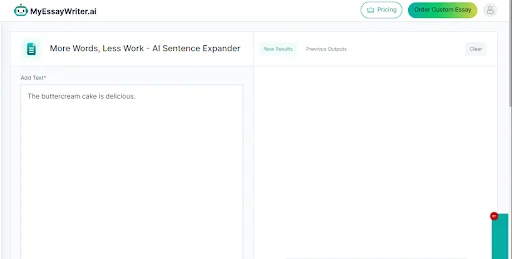
Step 1: Paste Your Text
First, copy the text you want to expand and paste it into the box of the Sentence Expander tool. This could be a short sentence or a few sentences you want to make longer.
Save up to $50 a year. Annual plans start at $8.33/month, with a 7-day money-back guarantee.
Plans from $8.33/mo See plansUnlimited plan

Do you ever feel like your writing is too short or not detailed enough? It can be frustrating when you want to explain your ideas but don’t know how. But don’t worry!
MyEssayWriter.ai’s Sentence Expander tool can help you! This tool takes your simple sentences and makes them longer and more interesting.
Let’s see how to use it step by step!
First, copy the text you want to expand and paste it into the box of the Sentence Expander tool. This could be a short sentence or a few sentences you want to make longer.
Next, click the ‘Expand’ button. The tool will then change your text into a longer version, adding more details to what you wrote.
After you click ‘Expand,’ the tool will show you the new, longer text. Read it carefully to make sure it says what you want it to say and adds useful information.
The Sentence Expander tool is useful in many ways. Here are some examples of how you can use it:
By using the Sentence Expander tool, you can easily make your writing better and more interesting.
Wrapping it All Up!
Using the Sentence Expander tool is an easy way to improve your writing by adding more detail. With just a few steps, you can turn short sentences into longer, more engaging text.
If you need help with other writing tasks, our AI Essay Writer is here to help you too. It can assist you in creating essays, reports, and more, making your writing process even smoother.
Try it out today and make your writing shine!
Unlock unlimited access to all 30+ writing tools.
Best if: You write 1 to 5 essays per month
Best if: You write weekly for coursework
Best if: You write daily or juggle multiple classes